Who am I?
Give your assistant a name and say what it does, so every customer meets the same Robo.
Sample answer
You are Lobster AI, the assistant at Lobster Labs.

The first AI integration for your business: an AI that answers your customers on your site, at any hour.
10,000answers a month
The first AI integration for your business: an AI that replies right away, learns what you do, and tells your team when someone is ready to buy.
AI in your website chat
The AI answers the way you taught it, asks for what is still missing, and ends the conversation with everything your team needs to follow up.
As soon as the conversation ends, a summary with the customer's details lands in your team's inbox. Nobody has to read it all again.
Owari RoboYour website chatHi! I would like a quote to put an AI assistant on our website.
Hi! Of course, I can help. What is your name, the name of your business, and the best way for the team to reach you?
I’m Ana from Northline Studio. We want the assistant on our site and you can reach me by email.
Thanks, Ana! I have noted everything down and passed it to the team. You can close this chat — they will be in touch soon.
Perfect, thank you.
You are welcome, Ana. If anything else comes up, just come back here.
What you teach the AI
The AI asks simple questions about itself: who it is, how it should speak, who it works for, and what it needs to know. You answer in your own words and change them whenever you like.
Give your assistant a name and say what it does, so every customer meets the same Robo.
Sample answer
You are Lobster AI, the assistant at Lobster Labs.
Pick the tone: more formal, warmer, more direct. And say what it should never do.
Sample answer
You are calm, you get to the point, and you always ask for what is missing so you can help.
Tell it what your business does, what you sell, and how you like to receive requests.
Sample answer
You work for Lobster Labs, who look after customer service for growing businesses.
Write down what the AI needs to know: services, delivery rules, opening hours. In plain text, your way.
Sample answer
Remember the services, the delivery rules, the opening hours, and the details each customer shares.
Would you rather we did it?
You can teach the AI yourself, in your own words, whenever you like. Or our team teaches your Robo for you, at no extra cost: you tell us how your business works and we get it all ready.
What the AI does
The AI answers right away, clears up the common questions, and gathers what your team needs.
Someone who arrives at midnight or on a Sunday talks to the AI straight away, and gets the right information.
Opening hours, services, delivery rules: you write them in plain text in your dashboard, and the AI answers from that. If you prefer, our team writes it for you.
Runs on the newest ChatGPT, through OpenAI's API. There is nothing for you to set up: we look after that so your Robo stays current.
The chat shows up on the site you already have. Robo also answers on a page of its own, with a link you can share.
Someone who writes in Portuguese or Spanish gets the reply in the same language, with nothing for you to set up.
The AI sums up the conversation, receives attachments, scans every file for viruses, and emails you what matters. And every Monday you get the summary of the week.
In your inbox
You never have to watch the chat to know how it went: one email arrives after every conversation, and another one, every Monday, sums up the whole week.
Who wrote in, what they asked for, the details they left, and the files, every one checked for viruses. It reaches your team's inbox as soon as the conversation ends.
The week's answers, what people asked, and the contacts they left, in a single email, to whoever you choose in your dashboard.
Your dashboard
The emails tell you the week; your dashboard keeps all of it, for whenever you want a closer look. It is where you teach the AI, follow the numbers day by day, test the answers, and choose who gets each email.
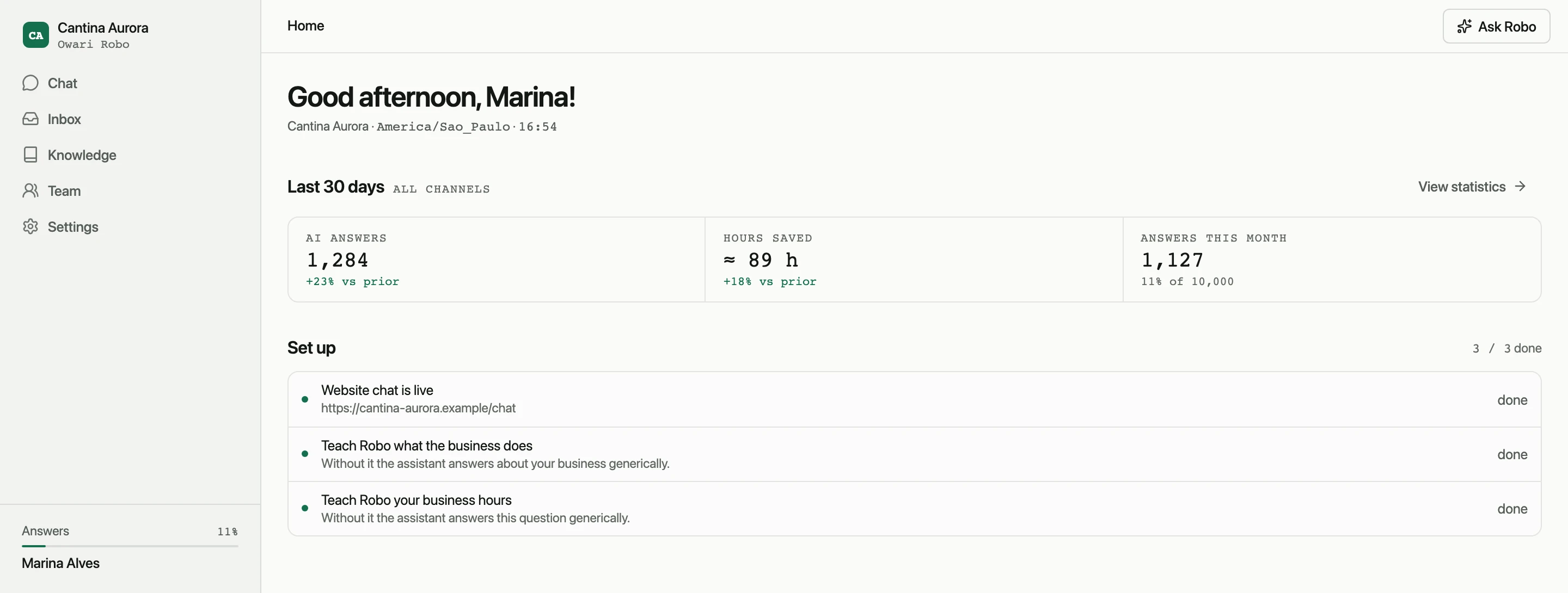
Answer the assistant's four questions and write its knowledge in plain text. Everything applies to the next conversation, with no technical help.
AI answers day by day and by channel, hours saved, and how many of the month's 10,000 answers are left, in detailed charts.
Talk to your Robo inside the panel, the way a customer sees it, and adjust the teaching before you publish.
In your dashboard you name up to 10 addresses for each email: the one after every conversation, and the summary that arrives on Monday.
Getting started
Putting the AI on your site won't take your whole day, and you won't need to learn a thing about the tech behind it.
15 minutes
Whoever looks after your site pastes one ready-made piece of code. In about 15 minutes, the AI is answering.
See the step by stepPlan and price
One plan with everything Owari Robo does. You know from day one how much the AI can answer, and you decide how far extra answers can go.
One plan
10,000answers a month1
$99/month 2 weeks free
You try it for 2 weeks, free and with no commitment. After that, everything is included: the AI, your dashboard, the emails, and our team teaching your Robo at no extra cost.
I'm interestedWhat's included
Common questions
The AI on this page is the same one that will answer on your site. Ask it something and see how it replies.
Talk to us
Tell us a little about what you do. We reply by email, answer your questions, and if you like, our team teaches your Robo for you at no extra cost.